

Description
Download Free Snipping Tool – Free, Secure & Powerful Screen Capture Software for Windows, Mac, Android & iOS
Looking for a reliable, free, and feature-rich screen capture tool? Free Snipping Tool is a powerful desktop utility designed to help you capture, edit, and share screenshots with ease across multiple platforms. Unlike the basic built-in snipping tools on Windows, this advanced software enhances your screen capture experience with professional-grade editing, instant sharing, and cloud integration. Whether you're documenting software bugs, creating tutorials, or sharing quick updates, Free Snipping Tool delivers speed, accuracy, and flexibility. With support for Google Drive, Dropbox, FTP, and WebRequests, it’s more than just a screenshot app—it’s a complete visual communication solution. Best of all, it’s completely free to download and use with no hidden fees or watermarks. Ideal for students, professionals, and casual users alike, this tool seamlessly integrates into your daily workflow and helps you work smarter.
Advanced Screen Capture & Editing Features
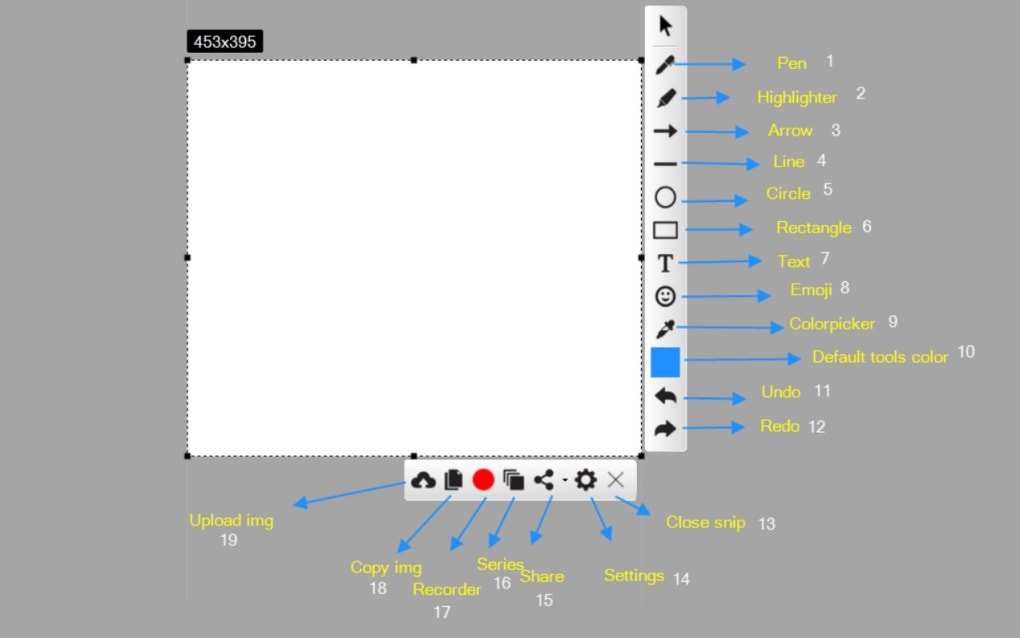
Free Snipping Tool goes far beyond the standard screenshot capabilities found in most operating systems. With its intuitive interface and robust feature set, it empowers users to capture any portion of their screen with precision. The tool supports multiple snipping modes—full-screen, window, rectangular, and free-form selection—giving you full control over what you capture. Once a screenshot is taken, it’s automatically loaded into the built-in editor, where you can enhance your image with a variety of tools. The pen tool allows for freehand drawing, while the highlighter helps emphasize important details. You can also add shapes like arrows, circles, rectangles, and lines with customizable thickness and color, making it perfect for annotating error messages or instructional visuals.
One of the standout features is the ability to blur or dim sensitive content directly within the editor. This is especially useful when sharing screenshots that contain confidential data. The tool also includes a text annotation feature, allowing you to add captions or notes directly onto the image. All edits are non-destructive, meaning you can always revert changes or save multiple versions. Additionally, the software supports high-resolution captures, ensuring your screenshots remain crisp and clear even when zoomed in. Whether you're creating a tutorial, reporting a bug, or sharing a project update, Free Snipping Tool ensures your visuals are professional and easy to understand.
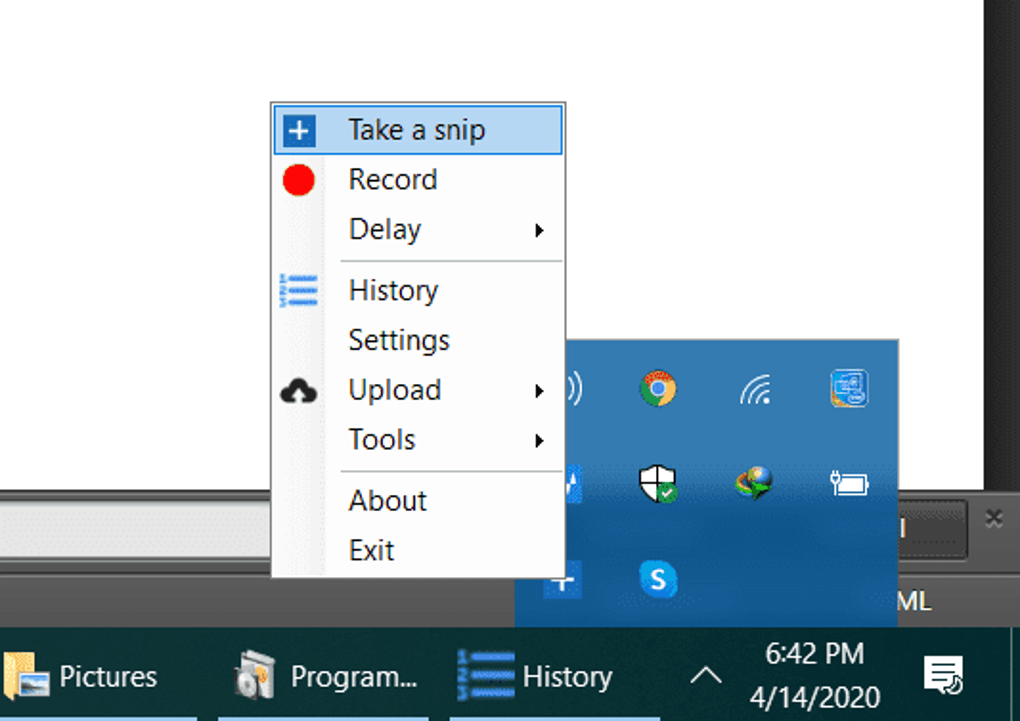
With seamless integration into your desktop environment, the tool runs quietly in the background and can be launched instantly via a system tray icon or keyboard shortcut. The minimalistic design ensures you’re not overwhelmed by unnecessary options, while still providing powerful functionality. It’s perfect for users who value both simplicity and performance in their daily tools.
Seamless Sharing & Cloud Integration
What truly sets Free Snipping Tool apart from its competitors is its advanced sharing ecosystem. While most screenshot tools only allow saving to your local drive, this software transforms your captured images into instantly shareable assets. After editing your screenshot, you can generate a secure, time-limited link that can be sent via email, messaging apps, or shared on social media. This feature is ideal for remote teams, educators, or anyone who needs to share visual feedback quickly.
For users who rely on cloud storage, Free Snipping Tool supports direct uploads to Google Drive, Dropbox, and FTP servers—eliminating the need to manually transfer files. This is particularly beneficial for collaborative projects where multiple team members need access to the same screenshots. You can also send your snips as WebRequests to any API endpoint, which is a game-changer for developers and automation workflows. This means you can programmatically send screenshots to a server or database without leaving the application.
Moreover, the software automatically saves your captures to a customizable default folder, and you can set up automatic naming conventions to keep your files organized. Whether you're working on a school assignment, documenting a client issue, or building a knowledge base, Free Snipping Tool ensures your screenshots are never lost and always accessible. The integration with popular platforms makes it a must-have tool for anyone who values efficiency, security, and cross-platform compatibility.
Easy Installation, Cross-Platform Compatibility & User-Friendly Design
Getting started with Free Snipping Tool is quick and hassle-free. The software is available for Windows, Mac, Android, and iOS, ensuring you can capture and share screenshots no matter which device you're using. The download is lightweight, typically under 20MB, and the installation process takes less than a minute. Once installed, the app runs smoothly in the background and integrates seamlessly with your system tray, so it’s always one click away.
On Windows and Mac, you can launch the tool using a customizable keyboard shortcut (default: Ctrl+Shift+S) or by clicking the system tray icon. On mobile devices, the app features a touch-optimized interface with gesture support for quick captures. The user interface is clean, minimal, and designed with usability in mind—no confusing menus or steep learning curves. Even first-time users can capture their first screenshot within seconds.
Free Snipping Tool is also regularly updated with performance improvements, bug fixes, and new features. The developers are committed to maintaining a secure and reliable experience, with regular security patches and compatibility updates for new OS versions. Whether you're using Windows 10, Windows 11, macOS Ventura, or the latest Android/iOS versions, the tool remains stable and responsive. With its cross-platform support and consistent performance, Free Snipping Tool is a versatile solution for modern digital workflows.
Pros & Cons at a Glance
- Pros:
- Completely free to download and use with no limitations
- Supports multiple snipping modes (full-screen, window, free-form)
- Advanced editing tools: pen, highlighter, shapes, blur, text
- Direct cloud uploads to Google Drive, Dropbox, and FTP
- Instant shareable links with customizable expiration
- WebRequest integration for developers and automation
- Available on Windows, Mac, Android, and iOS
- Lightweight, fast, and regularly updated
- Cons:
- Advanced sharing features require internet connection
- Mobile version has fewer editing tools than desktop
- No built-in OCR (text recognition) feature
- Some users may find the interface too minimalistic
- Cloud integrations require account setup for each service
Frequently Asked Questions (FAQ)
Is Free Snipping Tool really free to use?
Yes, Free Snipping Tool is completely free to download and use. There are no hidden fees, subscriptions, or watermarks. All core features—including screen capture, editing, and cloud sharing—are available at no cost.
Can I use Free Snipping Tool on Mac and mobile devices?
Absolutely. Free Snipping Tool is available for macOS, Android, and iOS. While the desktop version offers the most features, the mobile apps provide reliable screen capture and basic editing for on-the-go use.
How do I share a screenshot using Free Snipping Tool?
After capturing and editing your screenshot, click the "Share" button. You can choose to generate a shareable link, upload to Google Drive or Dropbox, send via FTP, or send a WebRequest to a custom URL.
Does Free Snipping Tool support OCR (text recognition)?
Currently, Free Snipping Tool does not include built-in OCR functionality. However, you can copy text from your screenshots and paste it into an OCR tool for recognition.
Is my data secure when using Free Snipping Tool?
Yes, your screenshots are stored locally unless you choose to upload them. When sharing via cloud services, data is transferred securely using encryption. The app does not collect or sell your personal data.
Final Verdict: A Must-Have Tool for Every User
If you're looking for a powerful, free, and secure screen capture tool that does more than just take screenshots, Free Snipping Tool is the perfect choice. With its intuitive design, advanced editing features, and seamless sharing options across platforms, it outperforms the default Windows snipping tool and rivals many paid alternatives. Whether you're a student documenting assignments, a professional sharing reports, or a developer automating workflows, this software enhances productivity and communication.
Its cross-platform availability and regular updates ensure long-term usability. The fact that it’s completely free with no limitations makes it an unbeatable value. Don’t miss out—download Free Snipping Tool today and take control of your visual communication.
Download now and experience the future of screen capture!
Guides & Tutorials for Free Snipping Tool
How to install Free Snipping Tool
- Click the Preview / Download button above.
- Once redirected, accept the terms and click Install.
- Wait for the Free Snipping Tool download to finish on your device.
How to use Free Snipping Tool
This software is primarily used for its core features described above. Open the app after installation to explore its capabilities.
User Reviews for Free Snipping Tool 0
No reviews found





